Help
Getting started
After submitting your number, you will receive a message from the phone number 8233 - It will look something like this:
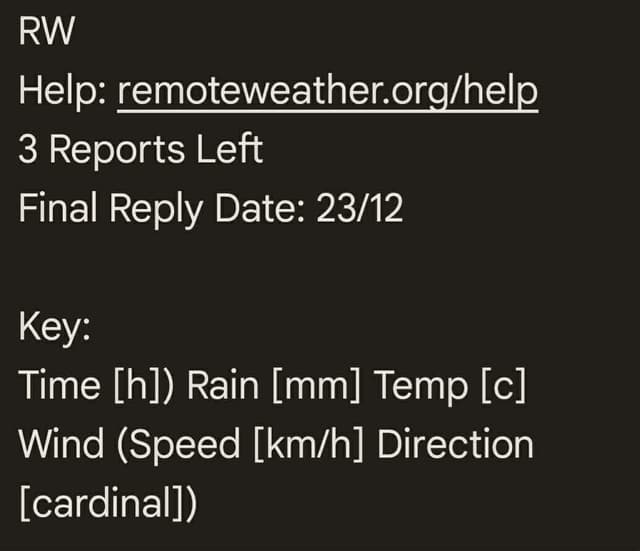
Let's break down what each part means:
First line - Title
RW = Remote Weather. Lets you know the message is from us.
Second line - Help page link
A link to this page.
Third line - Reports left
Tells you how many reports you have before your weekly limit is reached. These reset automatically every week, one week after you first enter your number.
Fourth line - Final reply date
This line tells you the last date (day/month) that you can message Remote Weather. Messages after this date likely won't receive a response. Unfortunately, due to a technical limitation, we can't receive replies from you unless we have sent you a message within the last 7 days.
Final line - Weather decoding key
When you receive a text weather report, this is the key you use to decode it.
- The first value is time in 24 hour format. It will start at your current hour and increase in 2 hour increments.
- Separated by a bracket, the next value is total rainfall in millimetres over that period. Example: if the hour is 1, the next hour is 3, and the amount of rain 3mm, then the report expects a total of 3mm to fall between 01:00 and 03:00.
- The next value is the average expected temperature over that period in degrees Celsius.
- Finally, the values inside the brackets relate to wind. The number denotes wind speed in kilometres per hour, and the text, the wind's cardinal direction.
Requesting a weather report
Remote Weather works by giving you a report for a requested location. You let us know your request by sending a GPS coordinate. More specifically, a WSG84 coordinate, in decimal degrees format.
For example, if you wanted a report for Carrington Hut in Arthurs Pass, you would send something like: -42.9597, 171.4481
Both the How does it work? and Try it out sections of the main page give visual examples on ways to get these points.
If you want a report for your current location, the app GPSTest for Android is useful. You can use GPSTest's share function to send the location straight to your messaging app.
Reading a weather report
Once you have sent us your desired report location, all going well, you will receive a report. If you did something wrong, you should receive an error message. If this is the case, head to the errors page to get help. If you cannot work out the problem, please get in contact via the social links at the bottom of the page.
A successful report will look something like this:
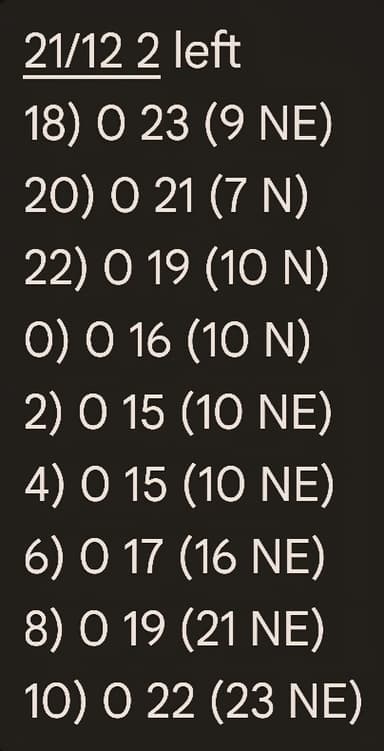
The first line of each report gives you important information about your account.
The first value is an updated final reply date. As we have just sent you a message, your 7 days to respond have been reset.
The next value x left tells you how many reports you have remaining for the week.
After the first line is the good stuff - Your weather report! Use the key from the initiation message to decode it.
Final reply date
Keep an eye on the final reply date sent to you in every message. If the date you are trying to request a report is later than this, you will very likely not get a response.
When this is the case, you need to re-enter your number on the main page to get a new initiation message. A visual representation of the final reply date and when you will need to re-enter your number is shown below:
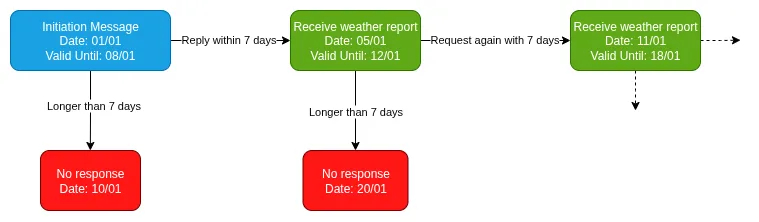
When you find yourself in the red category, enter your number on the main page to get a new initiation message.
I know this is an annoying limitation of Remote Weather. New Zealand law around automated text messages is very strict. There are ways to remove this limitation while also complying with the law. Unfortunately, it involves a lot of money and is currently outside the budget for a project of Remote Weather's size.